WhatsApp Web: Your Ultimate Guide to Online Messaging
Introduction to WhatsApp Web
WhatsApp Web has transformed the way people communicate by bringing mobile messaging to desktop and laptop screens. Instead of relying only on a smartphone, users can access their chats, send messages, and share files directly from a browser. This makes multitasking easier and improves productivity for both personal and professional use. WhatsApp Web acts as an extension of the mobile app, syncing all conversations in real time.
The growing demand for faster communication has made WhatsApp Web an essential tool for millions of users worldwide. Whether you are working in an office, studying, or managing business conversations, WhatsApp Web provides a seamless messaging experience without constantly switching between devices.
What is WhatsApp Web and How It Works
WhatsApp Web is a browser-based version of WhatsApp that mirrors your mobile app. It does not function independently; instead, it connects to your phone through a secure QR code pairing system. Once connected, all messages from your phone appear instantly on your computer screen.
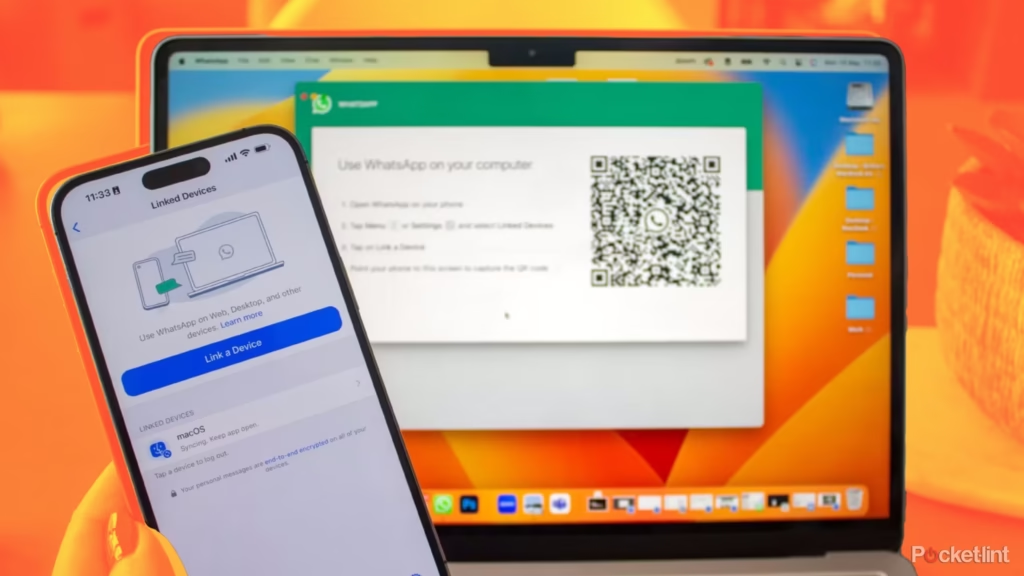
To use WhatsApp Web, users simply open the official website in a browser and scan the QR code using the WhatsApp mobile app. After successful linking, chats are synchronized automatically. Any message sent or received through WhatsApp Web also appears on the phone and vice versa.
This synchronization ensures that users remain connected across devices without losing chat history or media files. However, the phone must remain connected to the internet for WhatsApp Web to function properly.
Setting Up WhatsApp Web for the First Time
Setting up WhatsApp Web is simple and takes only a few seconds. First, open a browser like Chrome, Firefox, or Edge on your computer and visit the WhatsApp Web page. Next, open WhatsApp on your phone and go to the linked devices option.
Tap on “Link a Device” and scan the QR code displayed on the screen. Once scanned, your account will be connected instantly. All your chats, contacts, and media will appear on your computer.
This quick setup process makes WhatsApp Web accessible even for beginners who are not highly tech-savvy. It eliminates complicated installations and allows instant access to messaging services.
Key Features of WhatsApp Web
WhatsApp Web offers almost all the features available on the mobile app. Users can send and receive text messages, voice notes, images, videos, documents, and stickers. Drag-and-drop functionality makes file sharing even easier on a desktop.
One of the most useful features of WhatsApp Web is keyboard typing. It allows faster communication compared to mobile typing. This is especially beneficial for office workers and students who handle long conversations.
Notifications also appear directly on the desktop, ensuring that no message is missed while working on other tasks. Group chats, broadcast messages, and status viewing are also fully supported on WhatsApp Web.
Advantages of Using WhatsApp Web in Daily Life
WhatsApp Web offers several advantages that make communication more efficient. The biggest benefit is convenience. Users can manage conversations while working on their computer without picking up their phone repeatedly.
Another advantage is productivity. Professionals can respond to clients, share documents, and manage business communication more effectively. Copy-paste functionality between files and chats saves significant time.
WhatsApp Web also reduces phone dependency. It allows users to continue conversations even when their phone is charging or placed away from them. This makes it a useful tool for long working hours.
For students, WhatsApp Web helps in sharing notes, assignments, and group discussions quickly. The larger screen also makes reading long messages easier.
Security and Privacy on WhatsApp Web
Security is a major concern for users, and WhatsApp Web uses end-to-end encryption to protect messages. This means only the sender and receiver can read the content, not even WhatsApp itself.
However, users should be careful when using WhatsApp Web on public or shared computers. Always log out after use to prevent unauthorized access. The “Log out from all devices” feature in the mobile app provides additional control over active sessions.
WhatsApp Web also notifies users about active sessions, allowing them to monitor where their account is logged in. This ensures better security and transparency.
Common Issues and How to Fix Them
Sometimes users may face issues while using WhatsApp Web. One common problem is connection failure. This usually happens when the phone loses internet access. Ensuring a stable internet connection on both devices resolves this issue.
Another issue is QR code scanning errors. Cleaning the camera lens or refreshing the browser page can help fix this problem. Clearing browser cache may also improve performance.
If messages are not syncing, restarting both the phone and browser often solves the issue. Keeping the WhatsApp app updated also ensures smooth performance of WhatsApp Web.
WhatsApp Web for Business Use
WhatsApp Web is widely used by businesses for customer communication. It allows quick responses to inquiries, sharing of product catalogs, and managing client conversations efficiently.
Small businesses benefit greatly from WhatsApp Web because it eliminates the need for expensive communication tools. Customer support teams can handle multiple chats at once using a desktop interface.
With features like file sharing and group messaging, WhatsApp Web becomes a simple yet powerful tool for managing business communication.
Tips for Using WhatsApp Web Effectively
To get the most out of WhatsApp Web, users should learn a few helpful tips. Using keyboard shortcuts can significantly improve speed and efficiency. For example, searching chats or switching between conversations becomes faster.
Keeping notifications enabled ensures that important messages are never missed. Organizing chats by pinning important conversations also helps in better management.
It is also recommended to regularly check linked devices in the mobile app for security purposes. This ensures that WhatsApp Web sessions remain safe and controlled.
Limitations of WhatsApp Web
Although WhatsApp Web is highly useful, it does have some limitations. The biggest limitation is its dependency on the mobile phone. If the phone is turned off or disconnected from the internet, WhatsApp Web stops working.
Some advanced mobile features may also be limited or delayed on the web version. Despite these limitations, WhatsApp Web remains a powerful extension of the mobile app.
Conclusion
WhatsApp Web has become an essential communication tool in the digital age. It bridges the gap between mobile and desktop messaging, offering convenience, speed, and productivity. From personal chats to professional communication, WhatsApp Web simplifies daily interactions.
With its easy setup, strong security, and useful features, WhatsApp Web continues to grow in popularity. Whether for work, study, or personal use, it provides a reliable way to stay connected anytime and anywhere.