Troubleshooting Common Issues with GM TECH2 Scanner
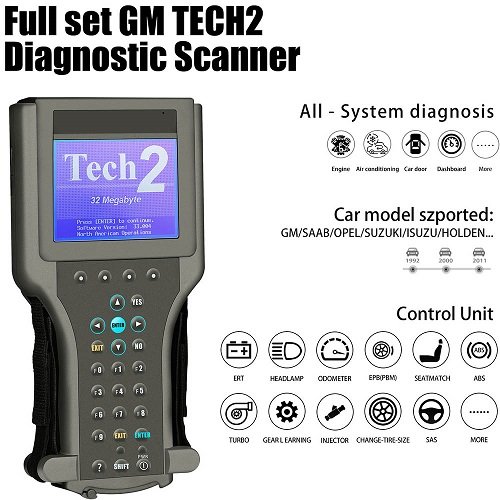
Introduction to the GM TECH2 Scanner
The GM TECH2 Scanner is a powerful diagnostic tool widely used by automotive technicians and car enthusiasts to diagnose and troubleshoot vehicles manufactured by General Motors. Known for its reliability and dealer-level functionality, the GM TECH2 Scanner provides in-depth insights into vehicle systems, including engine, transmission, ABS, and more. However, like any advanced electronic device, users may occasionally encounter issues while operating it. Understanding how to troubleshoot these problems can save both time and money while ensuring accurate diagnostics.
Common Problems with GM TECH2 Scanner
Scanner Not Powering On
One of the most common issues users face with the GM TECH2 Scanner is failure to power on. This problem can stem from multiple sources, including faulty cables, drained vehicle battery, or internal hardware issues.
To resolve this:
- Check the power cable and ensure it is securely connected.
- Verify that the vehicle’s battery is fully charged.
- Inspect the cigarette lighter adapter or DLC cable for damage.
- Try powering the GM TECH2 Scanner using an alternative power source if available.
If the device still does not turn on, the issue might be internal, requiring professional repair.
Communication Errors with Vehicle
Another frequent issue with the GM TECH2 Scanner is the inability to communicate with the vehicle. This can be frustrating, especially when performing critical diagnostics.
Possible causes include:
- Incorrect vehicle model selection
- Loose or damaged diagnostic cable
- Faulty vehicle OBD port
- Software compatibility issues
To fix this:
- Double-check that the correct vehicle make, model, and year are selected.
- Inspect the DLC cable for any visible damage.
- Ensure the connection between the GM TECH2 Scanner and the vehicle is secure.
- Restart both the scanner and the vehicle ignition.
Updating the scanner’s software can also resolve compatibility issues.
Memory Card Errors
The GM TECH2 Scanner relies on a PCMCIA memory card to store diagnostic software. Errors related to this card can prevent the device from functioning properly.
Common symptoms include:
- “No valid card inserted” message
- Freezing during operation
- Failure to load diagnostic programs
Troubleshooting steps:
- Remove and reinsert the memory card securely.
- Clean the card contacts gently with a soft cloth.
- Ensure the card is properly programmed for your vehicle type.
- Replace the memory card if it is damaged or corrupted.
Keeping a backup of your GM TECH2 Scanner software is always recommended.
Software-Related Issues
Outdated Software
Using outdated software on your GM TECH2 Scanner can lead to inaccurate readings or limited functionality. As vehicle systems evolve, updated software becomes essential.
To address this:
- Regularly check for software updates.
- Use a compatible TIS (Technical Information System) to update your scanner.
- Ensure the update process is not interrupted to avoid corruption.
An updated GM TECH2 Scanner ensures compatibility with newer GM models and improves overall performance.
Software Freezing or Crashing
Sometimes the GM TECH2 Scanner may freeze or crash during operation. This issue can disrupt diagnostics and lead to incomplete data.
Possible solutions:
- Restart the scanner and try again.
- Remove unnecessary stored data from the memory card.
- Ensure the scanner is not exposed to extreme temperatures.
- Reinstall the software if the problem persists.
Maintaining proper storage conditions for your GM TECH2 Scanner can prevent such issues.
Hardware Malfunctions
Screen Display Issues
A malfunctioning display is another issue that can occur with the GM TECH2 Scanner. Users may experience dim screens, flickering, or no display at all.
To troubleshoot:
- Adjust brightness settings.
- Check for loose internal connections (if comfortable opening the device).
- Avoid using the scanner in extremely bright sunlight.
- Replace the screen if it is physically damaged.
Proper handling can significantly extend the life of your GM TECH2 Scanner screen.
Keypad Not Responding
The keypad is essential for navigating the GM TECH2 Scanner interface. When it stops responding, it can hinder usability.
Solutions include:
- Clean the keypad to remove dirt or debris.
- Restart the device.
- Check for internal wear and tear.
- Replace the keypad if necessary.
Regular cleaning and careful usage can prevent keypad issues.
Connection and Cable Problems
Faulty DLC Cable
The Data Link Connector (DLC) cable is crucial for communication between the GM TECH2 Scanner and the vehicle. A damaged cable can lead to connection failures.
To fix:
- Inspect the cable for cuts or bent pins.
- Replace the cable if damage is detected.
- Ensure proper alignment when connecting.
Using high-quality cables with your GM TECH2 Scanner ensures reliable performance.
Loose Connections
Loose connections can interrupt diagnostics and cause intermittent errors.
Troubleshooting steps:
- Secure all connections firmly.
- Avoid moving the scanner while in use.
- Check ports for wear or debris.
Ensuring stable connections is key to accurate diagnostics with the GM TECH2 Scanner.
Tips for Maintaining Your GM TECH2 Scanner
Regular Updates
Keeping your GM TECH2 Scanner updated ensures optimal performance and compatibility with modern vehicles.
Proper Storage
Store the scanner in a cool, dry place to avoid damage from moisture or extreme temperatures.
Handle with Care
Avoid dropping or mishandling the device, as physical damage can lead to costly repairs.
Use Genuine Accessories
Always use compatible and high-quality accessories with your GM TECH2 Scanner to prevent performance issues.
When to Seek Professional Help
While many issues can be resolved through basic troubleshooting, some problems may require expert attention. If your GM TECH2 Scanner continues to malfunction despite trying the above solutions, it is advisable to consult a professional technician or contact the manufacturer for support.
Conclusion
The GM TECH2 Scanner is an essential tool for diagnosing and maintaining GM vehicles. Although it is highly reliable, occasional issues can arise due to hardware faults, software glitches, or connection problems. By understanding common problems and applying the right troubleshooting techniques, users can keep their GM TECH2 Scanner functioning efficiently. Regular maintenance, updates, and careful handling will ensure that this valuable diagnostic tool continues to deliver accurate and dependable results for years to come.