What Developers Should Know About Azure Account Setup
As cloud computing continues to dominate the software development landscape, Microsoft Azure has become a cornerstone platform for deploying, managing, and scaling modern applications. For developers, diving into Azure often starts long before writing the first line of infrastructure-as-code or pushing code to an app service. It begins with setting up the Azure account correctly.
While provisioning resources and configuring CI/CD pipelines are standard daily tasks, understanding the nuances of account hierarchy, subscription models, security baselines, and billing structures can save your team from costly architectural mistakes down the line. Whether you are an independent contractor, part of a startup engineering team, or an enterprise architect, mastering the foundational layers of Azure account setup is essential for long-term project success.
Understanding the Azure Architectural Hierarchy
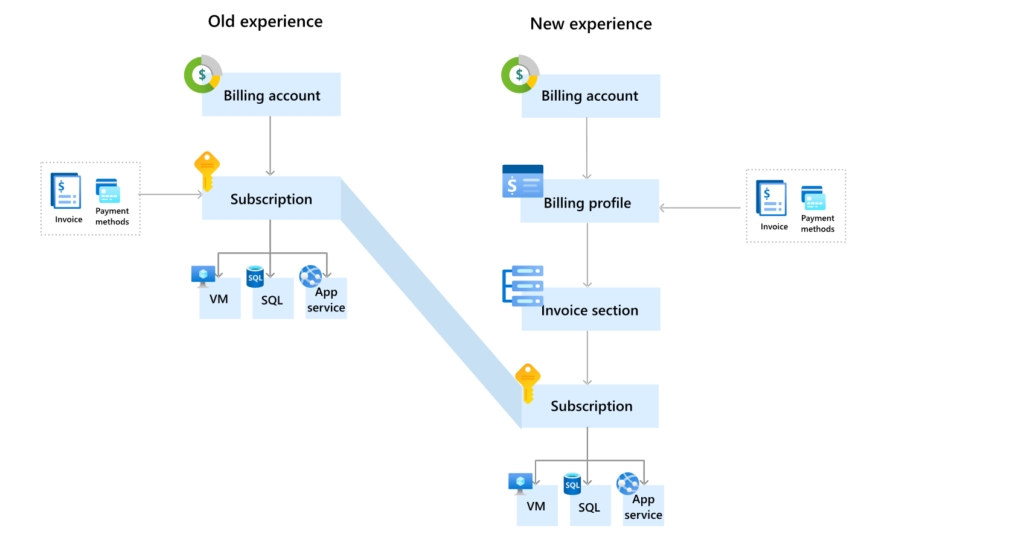
Before clicking through registration forms, every developer needs to understand how Microsoft structures ownership and resources. Azure is not just a flat collection of virtual machines and databases; it relies on a strict, four-tier management hierarchy that governs everything from access control to billing.
The Management Group and Tenant Level
At the absolute top of the identity tree is the Azure Active Directory (Azure AD) tenant, now formally known as Microsoft Entra ID. This directory represents your organization and manages user identities, service principals, and group memberships. Above or alongside tenants, Management Groups allow enterprises to organize multiple subscriptions into logical business units, applying governance and compliance policies hierarchically.
Subscriptions and Resource Groups
For most developers, the primary boundary of interaction is the Subscription and the Resource Group. A subscription serves as a billing and management boundary for Azure services. Most engineering teams have multiple subscriptions—such as Development, Staging, and Production—to isolate environments and enforce strict security budgets.
Beneath subscriptions sit Resource Groups. A Resource Group is simply a container that holds related resources for an Azure solution. Best practices dictate that resources sharing the same lifecycle—such as a web app, a SQL database, and a storage account for a single microservice—should reside in the same resource group to simplify deployment, monitoring, and deletion.
Navigating Account Types and Licensing Models
Choosing the right entry point for your cloud journey depends heavily on your immediate goals, project scope, and budget constraints. Developers often start with low-cost or free options before graduating to production-ready enterprise agreements.
Free Tiers and Developer Credits
If you are experimenting with Azure services, evaluating its ecosystem, or learning cloud architecture, starting with a Free Account is ideal. Microsoft typically offers a credit balance for the first 30 days, alongside access to popular services like Linux virtual machines, SQL databases, and blob storage for a full 12 months. This allows developers to test out concepts without financial risk.
Pay-As-You-Go and Enterprise Agreements
When moving beyond sandbox environments, teams transition to Pay-As-You-Go subscriptions or enterprise-level commitments. Pay-As-You-Go charges your credit card monthly based strictly on consumption, making it perfect for unpredictable workloads and smaller projects. Conversely, large organizations often Buy Azure Account frameworks tied to Enterprise Agreements (EAs) or Cloud Solution Provider (CSP) programs, which unlock volume discounts, dedicated support channels, and centralized corporate billing management.
Identity, Access Management, and Security Foundations
One of the most critical aspects of Azure account setup is securing your environment from day one. In the cloud, security is a shared responsibility, and identity is your first—and often strongest—line of defense.
Role-Based Access Control (RBAC)
Never use a single root account for all development tasks. Azure Role-Based Access Control allows you to grant precise, least-privilege access to team members. Instead of giving everyone Owner or Contributor rights across the entire subscription, assign specific roles such as Website Contributor, Virtual Machine Contributor, or Reader based on individual responsibilities. This minimizes the risk of accidental resource deletion or unauthorized configuration changes.
Multi-Factor Authentication and Service Principals
Enabling Multi-Factor Authentication (MFA) for every user account associated with your Azure tenant is non-negotiable. Furthermore, when writing automation scripts, GitHub Actions workflows, or Terraform configurations, avoid embedding master credentials in your source code. Instead, configure Service Principals or Managed Identities to authenticate securely against Azure resources without exposing human user credentials.
Cost Management and Governance Best Practices
Cloud bills can scale rapidly if resources are left running unmonitored. Setting up proactive governance measures during the initial account configuration phase prevents unpleasant financial surprises at the end of the month.
Budgets and Alerts
Azure provides native Cost Management tools that allow you to set strict financial thresholds. Developers should establish automated budget alerts that notify engineering leads via email or webhook when spending reaches 50%, 80%, or 100% of a predefined monthly limit.
Tagging Strategies
Implementing a standardized resource tagging policy from the beginning is vital for tracking expenses. By applying metadata tags—such as Environment:Production, Owner:DevOps, or CostCenter:Engineering—to your resource groups and individual assets, you gain granular visibility into which projects or teams are consuming the most resources. This data makes internal chargebacks and cost optimization audits significantly easier.
Conclusion
Setting up an Azure account goes far beyond filling out billing details and agreeing to terms of service. For developers, it lays the structural groundwork for security, resource organization, cost control, and scalable architecture. By understanding the management hierarchy, selecting the appropriate subscription model, enforcing strict access controls through RBAC, and implementing proactive cost governance, you set your engineering projects up for smooth, secure, and sustainable growth in the cloud. Take the time to configure your environment correctly from the start, and your future self—and your finance department—will thank you.