Windows VPS RDS CAL and Flexible Work Arrangements
Flexible work arrangements have changed how businesses manage employees, applications, files, and remote access. Companies increasingly need systems that allow employees to work from different locations while maintaining reliable access to business software and data. A Windows VPS with the appropriate Windows VPS RDS CAL licensing can support this type of working environment by providing a centralized Windows-based workspace that authorized users can access remotely.
Understanding Windows VPS for Flexible Work
A Windows VPS is a virtual private server running a Windows operating system in a hosted environment. Instead of depending entirely on a physical office computer, employees can connect to the server remotely and use applications hosted on it.
This arrangement can be useful for organizations with employees working from home, traveling between locations, or operating in hybrid teams. The server remains available in a data center, while authorized users connect through remote desktop technology.
For businesses considering this approach, licensing is an important part of the planning process. Windows VPS RDS CAL requirements should be understood before multiple users are given remote access to Windows Server resources.
What Is an RDS CAL?
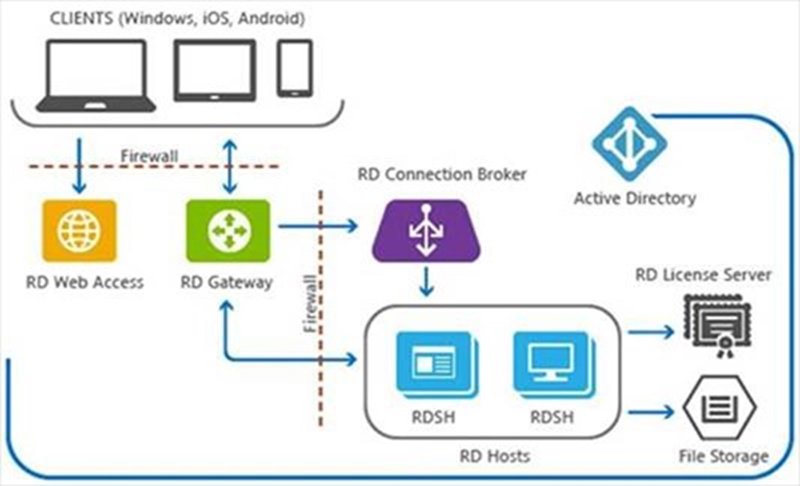
RDS stands for Remote Desktop Services. It is a Windows Server feature that allows users to access a remote desktop session or applications hosted on a server.
A Remote Desktop Services Client Access License, commonly called an RDS CAL, provides the licensing rights required for users or devices to access RDS functionality under applicable Microsoft licensing terms.
There are generally two common licensing approaches: User CALs and Device CALs. A User CAL is associated with a user who may access the service from multiple devices, while a Device CAL is associated with a particular device that multiple users may use.
Businesses should determine which licensing model fits their working environment and verify current Microsoft licensing requirements before deployment.
Supporting Remote and Hybrid Employees
One of the main advantages of a centralized Windows VPS environment is that employees can access a consistent workspace from different locations.
For example, an employee might work from an office computer during part of the week and use a laptop from home on another day. With a properly configured remote desktop environment, the employee can connect to the same hosted resources without requiring the complete business application environment to be installed on every personal device.
This can simplify administration and help businesses maintain greater consistency across distributed teams.
Centralized Access to Business Applications
Flexible work often requires access to accounting programs, customer management software, office applications, databases, and specialized business tools.
Installing and maintaining these applications independently on every employee’s computer can create administrative challenges. Version differences, missing updates, incompatible configurations, and hardware limitations may affect productivity.
A Windows VPS can provide a centralized environment where supported applications are installed and managed on the server. Authorized employees can then access the applications remotely.
When RDS is used, the relevant Windows VPS RDS CAL licensing should be included in the overall deployment plan.
Improving Consistency Across Devices
Employees may use desktops, laptops, and other supported devices while working remotely. These devices can have different specifications and software configurations.
A centralized Windows environment reduces the need to make every endpoint identical. Much of the processing and application management can remain on the hosted server.
This approach can be especially useful for organizations that want employees to have a consistent working environment regardless of where they are located.
However, remote access performance still depends on factors such as internet connectivity, server resources, application requirements, and the configuration of the remote desktop environment.
Security Considerations for Flexible Work
Remote access introduces security responsibilities that businesses should address carefully. A Windows VPS should not simply be exposed to the internet without appropriate controls.
Organizations can use strong authentication, access restrictions, firewall rules, security updates, account management, monitoring, and other appropriate protections.
User permissions should also follow the principle of least privilege. Employees should receive access to the applications and resources necessary for their responsibilities rather than unrestricted administrative access.
Regular backups are another important consideration. A backup strategy can help businesses recover from accidental deletion, hardware problems, software issues, or other incidents.
Managing Different Types of Workers
Flexible work arrangements can involve full-time employees, contractors, temporary staff, and external collaborators. Each group may require different access levels.
A centralized Windows VPS environment can make it easier for administrators to create and manage accounts according to organizational requirements. When an employee changes roles or leaves the organization, administrators can modify or disable the relevant account.
Licensing should also be reviewed whenever the number of users or devices changes. Businesses should ensure that their Windows VPS RDS CAL arrangements remain appropriate for their actual usage and the applicable licensing terms.
Performance and Server Resources
The quality of a remote desktop experience depends heavily on the VPS resources available. Processor capacity, memory, storage performance, and network connectivity can all influence how smoothly applications operate.
If several employees connect simultaneously, a server sized for only one or two users may become overloaded. Businesses should estimate expected concurrent usage and the resource requirements of their applications before selecting a VPS configuration.
Monitoring resource utilization after deployment can also help identify whether additional capacity is needed.
Flexible Work Without Losing Central Control
Remote work does not have to mean losing centralized management. A properly designed Windows VPS environment can give employees flexibility while allowing administrators to maintain control over applications, accounts, updates, and server resources.
For example, a business could maintain its core accounting application on the VPS while allowing authorized finance employees to access it remotely. The employees can work from different locations while the organization retains centralized control of the application environment.
This model can also simplify application updates because administrators may only need to update the centralized environment rather than manually updating every employee workstation.
Choosing the Right Licensing Approach
Licensing should be considered alongside technical requirements rather than treated as an afterthought. Businesses should identify how many users and devices require remote access and determine which licensing model applies.
Because Microsoft licensing terms can vary according to products, deployment models, and usage scenarios, organizations should verify current requirements directly with Microsoft or an authorized licensing specialist.
The phrase Windows VPS RDS CAL covers an important part of planning for Windows-based remote desktop environments, but licensing is only one component of a successful flexible-work strategy.
Building a Practical Remote Work Environment
A successful flexible work setup combines suitable infrastructure, appropriate licensing, security controls, reliable connectivity, and clear access policies.
Before deployment, businesses can document which employees need remote access, which applications they use, how many users may connect simultaneously, and what security requirements apply. This information can guide decisions about VPS resources and remote desktop configuration.
Testing the environment with a small group of employees before wider deployment can also reveal performance or usability issues.
Conclusion
Flexible work arrangements require technology that can provide employees with reliable access while keeping business systems manageable and secure. A Windows VPS can provide a centralized Windows environment that supports remote employees, hybrid teams, and distributed organizations.
When Remote Desktop Services are part of the solution, businesses should carefully consider their Windows VPS RDS CAL requirements, user and device access patterns, server resources, and security controls. With thoughtful planning, a Windows-based remote desktop environment can become a practical foundation for modern flexible working.